 Coingecko
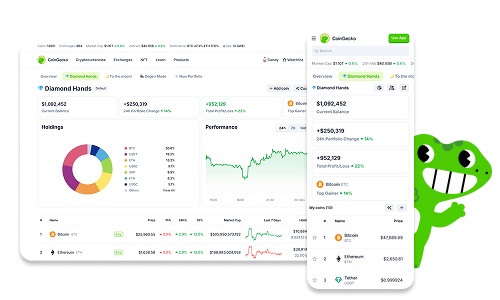
CoinGecko portfolio tracks holdings and profit or loss through transaction records and wallet data
CoinGecko portfolio combines recorded holdings with market prices to show asset values and profit or loss. Manual portfolios use the transactions that you enter, while wallet tracking reads supported public blockchain data. The distinction matters when checking performance: a correct token balance does not, by itself, establish what you paid for that position.
A useful portfolio review separates quantity, acquisition cost and valuation price. Each answers a different question, and each can explain a mismatch. Start with how the holdings entered the tracker before interpreting changes in the displayed total.
A matching token balance confirms quantity, while meaningful profit and loss also requires the relevant acquisition costs and transaction history.
Manual records and wallet tracking
Manual tracking suits holdings whose purchase records you maintain yourself; wallet tracking reads a public address and displays supported holdings and performance metrics. Compare these options by the history that each captures. A manually entered position depends on your transaction records. An address view depends on supported blockchain data, with profit/loss and average buy price available for supported tokens.
A watchlist has a different purpose: it saves assets for observation without establishing a purchase history. Adding a coin through its star control places it in a portfolio list. Recording a position requires the relevant transaction information. Keep watched assets distinct from holdings when interpreting a portfolio total.
Holdings value and profit/loss
Holdings value expresses the market value of a position, while profit or loss compares value or sale proceeds with the relevant acquisition cost.
Quantity multiplied by the valuation price gives a position’s market value. The calculation requires both inputs to describe the same asset. Adding position values produces a combined valuation only when they use the same reporting currency. A changing price can therefore move the total without any change in token quantity.
Unrealized profit or loss concerns assets still held. Realized profit or loss concerns assets sold and the cost assigned to those sold units.
These distinctions also explain why an asset’s price-change percentage differs from personal performance. A market percentage describes movement over its stated interval. Personal performance reflects acquisition prices and subsequent activity. Purchases at different times create different starting points, even when every purchase concerns the same coin.
Transaction inputs and recorded position changes
A manual position needs the correct asset, transaction type, quantity and execution price, together with the transaction date and relevant costs. Use the purchase record to establish what happened. A market price displayed today cannot substitute for the amount paid earlier. Likewise, the total purchase amount and the price per coin describe different quantities.
A recorded purchase increases the quantity attributed to that position. A recorded sale reduces it and supplies sale information for performance tracking. These entries describe activity that occurred elsewhere; they do not place orders or move assets.
Fees deserve separate attention when comparing a tracker with an execution receipt. Establish whether a receipt shows an amount before fees or after them. Counting the same cost twice distorts performance, while omitting a cost overstates the economic result. Preserve the underlying receipt when its treatment needs clarification.
Why does total Cost stay unchanged after a sale?
Total Cost stays unchanged after a recorded sale because it measures accumulated purchase spending rather than the net amount remaining after sales. An unchanged figure therefore does not establish that the sale failed to register.
Net Cost answers a different question. CoinGecko describes it as Average Net Cost multiplied by Holdings. Keep those field meanings separate when reconciling a position. Total purchase spending, the remaining quantity and the net cost can change differently because they measure different parts of the transaction history.
Wallet coverage and acquisition history
Wallet tracking displays supported holdings from a public address, with performance metrics subject to token support. Coverage matters when interpreting an absent asset or missing profit/loss figure. Neither absence establishes that a wallet holds nothing. The account plan also determines how many wallet addresses you can track.
CoinGecko wallet tracking reads public blockchain data without requiring a wallet connection or transaction signature. This access cannot authorize spending. Public visibility still matters for privacy: an address exposes its public activity even when the tracker has no control over its assets.
Reconcile a position before continuing
After a position appears in the tracker, judge manual records and wallet tracking by the same criterion: whether the displayed quantity and cost information describe the intended holding. Open the underlying transaction records for comparison. The valuation relationship stays fixed, while the market price can change during your review.
Use these conditions to decide whether the position is ready for performance analysis:
- If the asset identity differs from your holding, resolve that mismatch before comparing values.
- If a manual quantity differs from your records, inspect purchases and sales for missing or duplicated entries.
- If a wallet asset is absent, check tracking coverage before interpreting the absence as a zero balance.
- If quantity agrees but acquisition cost is missing, treat the valuation and profit/loss as separate questions.
- If only the valuation differs, compare the reporting currency and price observation time before changing transaction data.
For a manual entry error, use the original transaction record to correct the affected information. Recheck quantity and cost after the correction. Continue when those fields agree with the records; a later price movement can still change the valuation. Leave unresolved acquisition costs unresolved rather than entering today’s price as a substitute.
Why can portfolio value differ from a sale quote?
Portfolio value can differ from a sale quote because a market reference price and an executable order price measure different conditions. CoinGecko aggregates market prices using exchange data and filters price outliers. A particular trading venue prices an order against the liquidity available there.
Order size, trading fees and price movement can alter the proceeds of an actual sale. The displayed portfolio value therefore estimates holdings at its reference prices; it does not specify the amount that an order will receive. A purchase or sale receipt supplies the execution amount for transaction records.
This distinction helps locate errors. A correct quantity paired with a different valuation price calls for a price comparison. A different quantity calls for a review of recorded activity. Changing historical purchases to force agreement with a live quote mixes those separate problems.
Separate portfolios and overlapping holdings
Separate portfolios let you organize holdings into distinct groups without combining every position into one view. CoinGecko supports multiple portfolios and lets you choose the destination when adding a coin. Clear names help distinguish actual holdings from assets that you only monitor.
Overlapping records require care when you calculate a combined total yourself. A holding represented in both a manual portfolio and a tracked address remains one holding. Adding both valuations counts it twice. Decide whether each portfolio represents a separate set of assets or another view of an existing position before combining its figures.
Transaction records outside the dashboard
Original transaction records preserve the details needed to explain a position when a dashboard figure looks wrong. Keep purchase and sale confirmations with their dates, quantities, execution amounts and fees. Those records establish historical activity independently of the market price that the tracker displays later.
Popular questions about Coingecko portfolio
Can I export the transactions entered in my CoinGecko portfolio?
CoinGecko does not provide a download or export of portfolio transactions created on its website or mobile app. Keep transaction records elsewhere if you need a reusable ledger or a file for another application. Sharing a portfolio watchlist does not provide a transaction export.
Does sharing a portfolio reveal my holdings and profit/loss?
CoinGecko hides holdings and profit/loss by default when you share a public portfolio watchlist. Sharing requires making the portfolio public, and you can return it to private afterward. Review the information visible in the shared view before distributing it, especially when the asset list itself is sensitive.
Will my saved portfolio appear on both the website and mobile app?
CoinGecko synchronizes saved portfolios across the website and mobile app. Use the same account on both devices. If the views differ, check that both show the same account and selected portfolio before treating the difference as a transaction error.
Is removing a coin the same as recording its sale?
Removing a coin changes the portfolio list, while recording a sale preserves information about a disposal. The Remove coin control asks for confirmation before removing the asset. Choose the action that matches your intention, and retain the transaction details that you need before clearing a tracked position.
How should I interpret a position with a balance but no known purchase price?
A balance with no known purchase price can support a current valuation when a market price exists, but it cannot establish purchase-based profit or loss. Find the acquisition record before interpreting performance. Entering zero or the current market price merely to fill the missing information changes the meaning of the calculation.